Archive for the ‘Uncategorized’ Category

What’s In Your Emergency Kit?

Tuesday, May 22nd, 2007

One of the entries on Lifehacker this week, featured this Momergency Kit that is full of items a mom might need in an emergency situation. We all know that emergencies come up when we least expect them, so it is definitely a great idea and something that every mom can use. Check out their list for some ideas of things you could be carrying around.

We have a lot of emergencies that happen throughout our week. Some of my “emergencies” include an extra long wait time at the doctor’s office, a dinner out where the waitress has decided to take her break while we are waiting to order, the time where I was stuck with my kid’s at that family member’s house who doesn’t like kids and has nothing childproof in their home…those are the types of emergencies that seem to come with regularity in my day.

I have a little bag of tricks that I like to keep in my car so that we have something to do when these emergencies arise. Some of the things in my emergency kit include:

Flash cards
Coloring Books & Crayons
Snacks- Cheerios, granola bars, fruit snacks
Small toys for the baby
Empty Sippy Cup (because we are always somewhere where we need one and there are none to be found)

Do you have anything that you like to have in your bag for these little emergencies? Please help the moms out there looking for new ideas for their own bag of tricks!

The Fashion Savvy Shopper

Monday, May 21st, 2007


While I have been rarely catching Oprah these days, I always read the description on my TiVo of each episode and then usually delete anything that doesn’t catch my eye. When it comes to episodes on saving or making money, I am always a sucker for those, I try to never miss anything on these topics.

I was not disappointed with this past Friday’s episode where a new line of clothing from Sarah Jessica Parker is set to come out on June 7th. If you still have it taped, it is worth it to watch! Her tag line is,”Fashion is Not a Luxury” and she has embraced that with a line of clothing from Steve & Barry’s that she is calling Bitten. These clothes are never over twenty dollars and include shoes, bags, suits, jackets, blazers & other fashionable gear, many never ever at the twenty dollar mark (even in the discount stores).

I can’t say whether or not the clothing is of good quality, but she is raving about it, so we will have to take her word on that one! The clothing line looks like it has tons of great basics, that will pair well with each other and as separates. While some critics have said the line is boring, I love a good basic line that will go with everything.

Among other honorable mentions in the episode were the line of basketball shoes (priced at $14.99 or less) & Target’s new line of Isaac Mizrahi wedding dresses under $100.

I love to shop for clothing at Goodwill and like to keep up on the latest trends and lines of clothing that are in fashion. Meredith, over at Like Merchant Ships, has a great post with a bunch of library recommendations for a thrift shopper that wants to score the big names in fashion.

My favorite online resources for fashion advice are The Frugal Fashionista & The Space Between My Peers. Add these ladies to your blog reading list- I promise you won’t be disappointed!

Do you have a brand of inexpensive clothing you could recommend or do you have a store that is your go-to for clothing? What is the best deal you have ever gotten on a piece of clothing?

The HP TouchSmart Computer: The Best Family Organizer Ever

Friday, May 18th, 2007

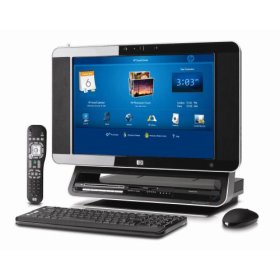
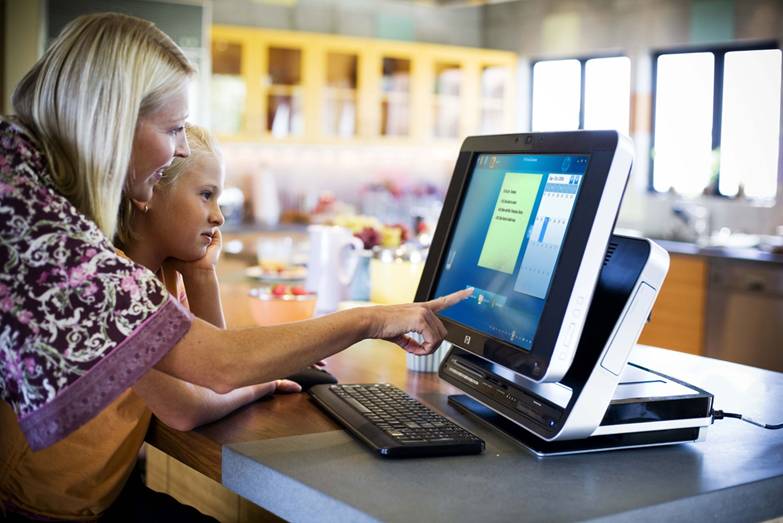
I have been in absolute heaven this past week, literally floating on air, since we received the HP TouchSmart PC to review. It is the ultimate mommy organizer and has everything that a mom could ever want included on it. I am not technical and I have a hard time figuring out things like this, but this computer was the easiest gadget I have ever used, as everything is clearly labeled and easy to use.

Here are some features that I would like to highlight:

Touchable Screen- The computer comes with a remote, a stylus pen, & a mouse (all wireless) that you can use to make your selections, but the ultimate tool is using just your finger to select anything on the screen. This makes it user-friendly for the little ones in the house, who aren’t able to master a mouse yet, but want to feel like a big kid using the computer themselves. They can use their finger to draw pictures or pick the music that they would like to listen to. This makes it a great selling feature for families of small children.

Family Calendar- The family calendar is very user-friendly and you can organize the calendar for the entire family or by each family member. On your calendar, there is a feature where you can leave post-it notes to each other, which can be written using your finger, the pen, or typed into the computer. The kids can draw a picture for daddy or you can just leave your hubby a sweet note like, “Put the trash out TODAY or else!” You can record notes to each other, as well, which can be a great feature when you don’t have time to write out a note.


Music Library-
The music library was the biggest selling point for me. Our family has a huge music collection and you can find discs scattered and scratched up all over our house. When I thought I had money, I was buying music for myself all of the time so we have over three hundred discs missing their cases, tossed in the car, or stuck in random players all over the house. I can never find the music I am looking for and I can’t remember the names of the any of the songs. The TouchSmart Computer allows you to quickly copy the disc onto the drive and then stores it in a library for you. You can scroll through the covers of all of your discs and pick the one you would like to listen to. You can cue the disc to go along with family photos or utilize the visualization feature on the computer. You can make playlists for entertaining or make fabulous dinner music. The screen is beautiful to watch and makes it a great feature for having the best parties in town. It is flat screen and high definition, what could be better than that?

Don’t like your music collection? The PC comes with the wires needed to listen to the radio too. The sound is clear and tuning is easy.


Television/DVD Player-
We did not want to pay for another satellite box or for cable in our kitchen, but an HDTV antennae (for approximately $30) is a great way to utilize this feature and be able to enjoy watching live television. It has built in DVR, so you can tape and watch all of your favorite shows just like your DVR or TiVo box. You can play all of your movies through it, although I wouldn’t recommend doing this at the dinner table, which can be fun for a mom who likes to watch chick flicks by herself while she is making the family dinner.


Family Photos-
Your family photos can be quickly organized, edited, and printed all in one place. The touch screen feature makes it feel like you are at a kiosk at your grocery store and you can do this all from your home. Unfortunately, the printer is not included with the PC, but needs to be purchased separately.

My only complaint about the product is that the touch screen can be difficult to maneuver, as you need your finger is just the perfect spot in order for it to do what you need it to do. At times, using the mouse or stylus pen is easier than utilizing the touch feature.

The design is sleek, and the keyboard fits neatly underneath the monitor in a little stowaway spot. The printer, can be set in the back where it is not even visible, making this very streamlined and elegant looking. It looks more like a television than a computer, but you have all the function of a computer.

I can’t rave about this product enough! The price tag is $1,849.99, so it is not the most affordable option for most families. If you needed a new television, a new computer, a DVD player, and a stereo, this would be a good bang for your buck and keep the clutter in your home under control. No more stacks of discs, no need to have fourteen appliances, and no more missing your appointments.

The best price listed online is currently through Amazon.

We thank HP for giving us the opportunity to share about their product and allowing us to express our opinions on it. It is a fabulous piece of equipment that would make a wonderful addition in any home!

Mommy Bloggers Creating the Buzz Around Town

Thursday, May 17th, 2007

The Wall Street Journal just did a great piece on how bloggers are now becoming the target for PR firms, as bloggers have the ability to create the buzz for new products by just showering bloggers with free stuff. They even highlight mommy bloggers as being a great resource to hype up their products, television shows, & movies.

“Who says you can’t buy love? Trying to tap into the burgeoning power of blogs as promotional tools and fed up with the jaded attitudes of professional critics and TV feature writers, studios and networks are flooding bloggers with free stuff in hopes the flattered recipients will reward them with positive coverage. Flowing into the trough is everything from fancy gym bags and toasters to video iPods and free trips. Some networks — in the spotlight this week as they unveil their fall schedules to advertisers — have even borrowed a term from the technology industry to describe the strategy: blogola.” WSJ

As a mommy blogger, I have had the opportunity to review tons of great products out on the market. Being on the mailing list of these public relations companies has been a dream come true for my family. Who wouldn’t want to try products before they come out? Who wouldn’t want to be able to give their opinions (good or bad) on things that they receive and provide feedback to companies on what moms really want?

We get probably four to six requests daily to review products and of those requests I may pick one or two. I try to pick products that fit well with my audience and the ones that I think you all would enjoy hearing about. Some of them are affordable and some are not, but I like to also highlight ways that moms can organize or run their homes more efficiently. I try to do my best to pick work-at-home moms and support what they do, as so many people have supported me in getting our site to this point. I try to share without compromising my integrity and always disclose to the companies that it will be a very honest review, which may/may not be very flattering.

Do you guys enjoy seeing products featured here? Do you take the opinion of mommy bloggers into account? Are moms selling out by featuring products on their blogs? If the tables were turned around, how would you respond to an outpouring of free stuff?

Disappointing News

Wednesday, May 16th, 2007

I love our bread outlet and go every other week to get all of our bread, bagels, muffins, & the occasional package of donuts. The ladies that work there know me by name and they love to get the updates on our family. They adore our Emily and give Ethan special treats when we come. I have loved going there and the great deals that I get.

When I walked in today, I noticed that they had changed all of their signs and increased their prices on every single item in the store. My whole grain bread that I was getting for a dollar was now doubled in price, as was just about everything in the store. The new prices were decent, but could be got at Aldi for the same/less or picked up on sale at other stores.

I paid for the items and expressed my disappointment over the price increase. I asked if the other outlets in the area had increased their prices as well, and they said all of the prices had increased in all of the stores in our area (we live in the Michiana area). The lady knocked a dollar off of the total, but it still ended up being more than I would like to spend on bread.

With gas at a whopping $3.39, I don’t feel inclined to make the effort to go there now.

So, do you have any tried and true bread machine recipes that you would like to share with me? Do you freeze the dough? Do you bake in the bread machine or do you use your oven to bake the bread? I am looking for any insight you guys can give on this, as I need to decrease our spending in this area now.

Please help me!

Adobe Photoshop & Premiere Elements

Tuesday, May 15th, 2007

I got the opportunity to try out the Adobe Photoshop & Premiere Elements software package that Adobe offers. Since I am a mom and I love to take pictures and video footage of my children, they knew that they had the right person to send it to.

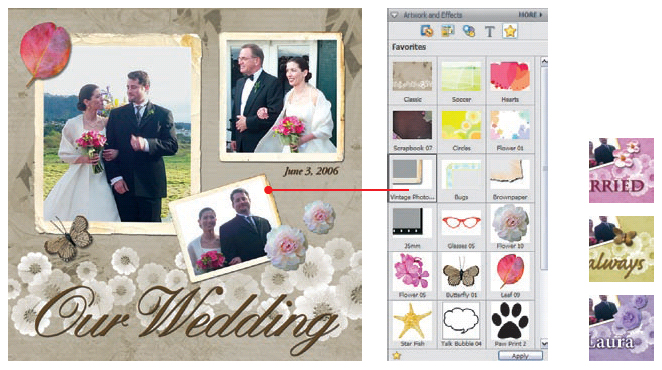
These award winning photo and video-editing products are great for any mom who is looking to get there photos edited and organized in a way that you can actually find the picture you are looking for. Photoshop Elements and Premiere Elements are very user-friendly and help organize, edit and share your most valued pictures and home movies. Not only that, but you can also use their software to create photo albums, scrapbooks, flash online photo galleries, making invitations and DVDs.

I haven’t gotten to toy around with this software as much as I would like. The user manuals for each of these products is over two hundred pages long, which tells me that the software offers a lot that I have yet to figure out.

I did some photo editing with the software and was impressed with all that you can do to edit the photos. The options are numerous and the process can be as complex or as simple as you would like to make it. For someone who enjoys editing her own photos, it is a fabulous software package to use.
In my opinion, one of the best features is that you can remove red eye with one click of the button. No need to zoom in on each eye or make sure your mouse is in the right place, just one simple click.

This product has received stellar reviews, and is definitely worth checking out! Learning the programs is time consuming, but worth the effort if you are interested in taking professional looking photos and capturing your memories in a fun way.

Gardening Update & Fun Summer Reads

Monday, May 14th, 2007


Well, I haven’t killed my plants yet so I guess my first gardening endeavor is going good…so far. Of course, you guys might get a good laugh at my expense because I actually thought I had squash already sprouting from the seeds I had planted. Just after I patted myself on the back, I realized that these were just little green pieces of nothing that fell off of a tree. I didn’t kill anything though, that was the point in sharing this!

I also have overcome another fear that I have…mowing! Yup, I am terrified of the mower! I told you guys that I am a total girly-girl. I think it was a discussion with my dad, who was trying to teach me how to mow, where he told me that rocks could get thrown at me if I wasn’t careful. He also redid all that I had mowed because I didn’t mow “the right way” and so I ended up crying and going inside. That is just the kind of fun sport I am!

I managed to mow without any injuries thankyouverymuch. I also made my husband’s day because he hates to mow the lawn. Unfortunately for him, this is probably not going to be happening with regular occurrence, but I did help him this week! I offered to switch roles and he could cook while I mowed the lawn, but he wouldn’t take me up on it. It makes me think I am getting the short end of the stick here.

Thanks for the fabulous gardening tips that you emailed and shared with me though! I appreciate all the help I can get OBVIOUSLY since I think I am growing imaginary plants.

Here are some old blog entries & articles that I thought you might enjoy. Now RUN outside and enjoy all that nice weather!

Solving the Sand Between Your Toes Blues

Cleaning Up Yo Grill

Busy Day Activities for Warm Weather

Frugal Teacher Gifts

Getting Ready for Summer

Gearing Up for Summer

Summer Survival

Organized Travel

Sneak Peek- HP Touchsmart PC

Thursday, May 10th, 2007
Guess what I am going to be reviewing? An HP Touchsmart PC! I can hardly believe it!

The HP company contacted us to see if we would be willing to give it a test drive in our house, and of course we said yes! You can imagine how much my husband (the computer guy) is geeking out about this right now. He keeps trying to explain how awesome it is going to be for me, but I am anxious to try it to see for myself.

If you would like to try this out and are in the Las Vegas area, the HP Touchsmart is currently on display at the 2007 Kitchen/Bath Industry Show. Please visit the link for more information about this show!

Here is some of the information about the product, courtesy of HP…

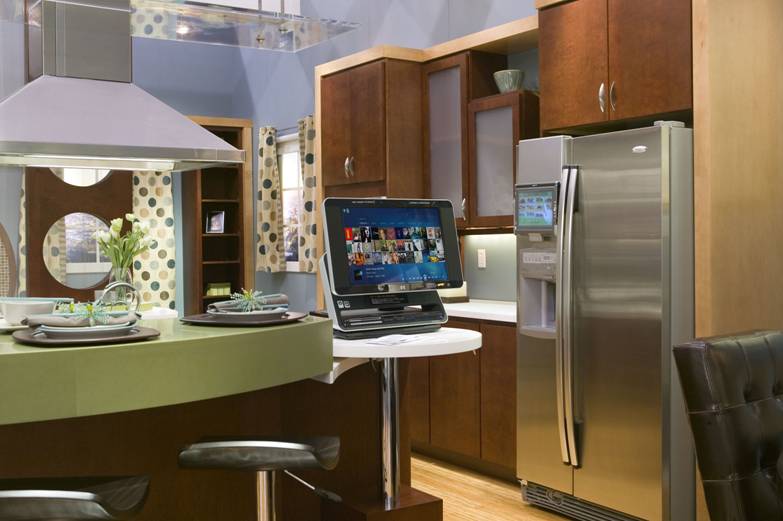
The Internet Home Alliance Research Council (IHARC), which includes Hewlett-Packard (HP), recently conducted a survey to determine what new products/services homeowners would like to add to their future kitchens. Study results were used to create a prototype of an ideal digital kitchen, which is currently on display at the 2007 Kitchen/Bath Industry Show in Las Vegas. Conveniently installed in the kitchen is the HP TouchSmart PC – this placement supports findings for consumer interest in a digital calendar and access to weather updates in the kitchen. Why the kitchen? Well, as you’re probably aware, it’s one of the busiest and most social rooms in the house.

The HP TouchSmart PC helps simplify family life by providing one-touch access to entertainment, communication and information. It also comes equipped with programs that allow busy families to keep track of schedules/appointments, view real-time weather updates, watch live/recorded TV and/or leave digital post-it notes or voice recordings for family members — all possible by the PC’s unique touch-enabled screen

We are looking forward to sharing our product experience with you all! Stay tuned for an in-depth look at what the HP Touchsmart system offers!

Repurposed: The Sandbox

Thursday, May 10th, 2007

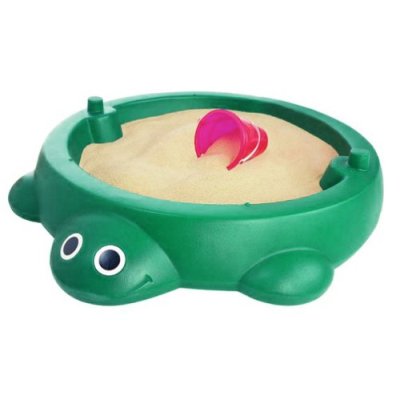
I might be among the minority here, but I detest sandboxes. I love for my kids to get to play with them at other people’s houses, but cleaning up the mess afterwards is no fun at all.

When our son was little though, our son’s therapist had recommended using one of these because our son had a true aversion to anything that felt funny to him. He would really freak out about sand, grass, or anything that would stick to him. The sandbox provided great therapy to help him get over these issues and now he is as dirty and sticky as any other child on earth.

Now that he had grown out of this issue, I was not looking forward to cleaning up sand around our house. We also had not bought any sand yet this year and I was trying to think of a new purpose for the sandbox. That is when I got the brilliant (probably not as brilliant as I think, but it was brilliant to me!) idea to repurpose this into a small baby wading pool.

Our daughter is seventeen months old and still not walking. She wants to be part of the sprinkler fun, but this requires me running through them with her and some days I just want to park myself in a chair while they play. Creating a space for her to play in water would be great, but I did not want to deal with those kiddy pools again this year (1. they are a pain in the rear 2. they get nasty quickly 3. they are a pain in the rear). I thought our sandbox would be a great substitute because it is not too deep, but deep enough for a toddler to enjoy a little splashing. It is also not deep enough that it requires a family of four to use all of their strength to tip the thing over and cause permanent grass damage from resting on our lawn.

Lucky for us, it is also deep enough for mommy & daddy to pop their toes in when the kids are in bed and enjoy a drink & chat.

What is something that you have repurposed in your home that has been a roaring success?

Frugal Summer Treat: Frozen Banana Popsicles

Wednesday, May 9th, 2007

I had never had a frozen banana before so I had no idea what we had been missing out on. I had seen frozen banana pops on an old episode of Rachael Ray’s 30 Minute Meals and thought that looked like a really weird snack. What could possibly taste good about frozen bananas? Boy, was I wrong!

When frozen, bananas actually taste like ice cream. They are cold and creamy and have none of the texture that they have when they are in their normal state. Rolled in chocolate and sprinkles, they make heavenly treats that are pretty figure friendly versus the ice cream variety.

Best of all, these treats are easy on the pockets and are a great way to use up some of the bananas that are sitting on your counter. They are quick to make and a fun treat to eat.

My husband ended up working late yesterday and I was having a hard day with the kids. I told them that we were going on a picnic and at the end of our picnic dinner, we would all get a fun treat to eat. I packed up summer sausage, cheese, crackers, pasta salad, and grapes. While I made the pasta salad, I put together our banana treats and popped them in the freezer to harden.

There was a lot of grumbling from my son about not wanting to go on a picnic, but I finally got him convinced. He was pretty surprised when the picnic was in our yard and not at the playground. I threw out a blanket on the lawn and we ate our dinner out there. It made for a quick clean up and it was a nice surprise when Ryan got home from work.

The kids played on the swing set while I cleaned up from our dinner and then I brought out the snack. My son, who is a huge banana fan, thought it was the coolest thing ever and he ended up eating two of them. After he finished, he was covered in chocolate so I let him take the hose and rinse himself off. He was soaked, but had a huge grin on his face. That is what summer is all about!

We are approaching his fifth birthday so I have started thinking about themes for his day recently. I noticed that Martha Stewart’s new line over at Michael’s has a really cute monkey birthday party set. Wouldn’t these be a cute treat to serve along with other fun monkey snacks (monkey bread & banana pancakes)? I am thinking of using this idea for Ethan’s birthday this July. Having the kids help make these with you for the party would be a fun way to involve them in the party process. Not only that, but what a cheap party snack they will make!

I highly recommend adding these sweet treats to your snack rotation. You can also make them a healthy breakfast snack, by incorporating other ingredients into them. Here are a few recipes to try. Feel free to share some of your own favorite banana popsicle ideas!

Chocolate Covered Bananas

6 ripe bananas
1 cup semisweet chocolate chips

Peel bananas and cut in half crosswise. Insert a wooden stick into the flat end of each banana half. Lay bananas on a shallow pan (I used a small cookie sheet) and freeze for approximately three hours. Melt chocolate chips in the microwave or over hot water. With a spatula, quickly spread melted chocolate over banana, coating well. Then roll in sprinkles, crushed nuts, or rice cereal. Wrap each banana in foil and store in your freezer.

Breakfast Banana Pops

4 large bananas
2 cups fruit-flavored yogurt, Nutella or peanut butter (For easiest spreading, dilute nut butters with enough vanilla or plain yogurt so it’s the consistency of thick cake batter)
1 cup combination of chopped dried fruit, granola, crushed cereal, crushed cookies or crushed candy

Peel the bananas, cut in half crosswise, and dip them in the yogurt. Roll them in the toppings to coat. Freeze until firm. Serve when firm.


Crispy Banana Pops

2 medium bananas
1/4 cup crisp rice cereal

1/4 cup miniature chocolate chips
2 tablespoons finely chopped peanuts
1 tablespoon light corn syrup

Cut bananas in half and insert a wooden popsicle stick into the cut end of each half. Freeze until firm (about ten minutes). Combine cereal, chocolate chips and peanuts in a shallow bowl, mix well. Uncover frozen bananas and brush with corn syrup. Roll bananas in cereal mixture to cat. Loosely wrap each coated banana with plastic wrap. Store in freezer for about ten minutes or until serving time. Serve frozen.