The Motherload Blog

It seems that everyone I know is crazy for Pinterest. In fact, my friends who may have never read a blog a day in their lives are now pinning fools.  From a business perspective, Pinterest is one of the best things that has ever happened to our website. Since starting to use it in April, we have had a steady growth of traffic averaging around 100,000 page views each month.  What is the secret to the traffic growth through Pinterest? I think it is a combination of many things that I have been working on and refining since I started using this tool for my site.

I wanted to share with you a few ideas for growing your web traffic using Pinterest and how to help your own site or blog grow. Anyone can be a Pinterest superstar, but you may need to make small changes in the way you blog to truly gain the traffic you desire.

 

Get Visual- For those that aren’t familiar with Pinterest, it is a basically a visual way to bookmark and categorize great things that you see on the web. Instead of a list of text bookmarks, it provides a bulletin board where you can visually see all the great projects, recipes, tips, and techniques all in one pretty space.

Since the bookmarks are visual, pictures are what get people pinning. If you have a wall of text and no pictures, no one will ever pin your content because they will have no images to grab. Of course, the prettier the picture, the more likely you will have pins and repins to your blog.  The best advice I can give you is to focus on developing your camera skills so that you can capture images that will capture the hearts of Pinterest users.

Next month I want to share with you some more photography tips, but feel free to browse our other photography tutorials that we offer on here for now.
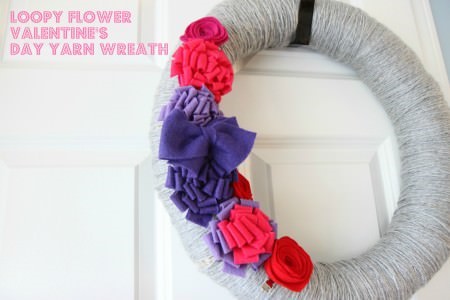


Make Pinning Simple- Although I am not a huge fan of text on my photos, adding text into your pictures will make pinning from your site easier.

When a user grabs images from your site, they can add a few words describing why they are pinning that image. More often than not, people skip this step and just pin the image of the item. By adding text right into your pictures that describes the item and it helps that image to go a little bit further.  Perhaps this wreath picture would be fine on it’s own, but the Loopy Flower Valentine’s Day Yarn Wreath really lets the reader know that they are going to learn how to make it for the holidays.

Let me illustrate why text in pictures can be so important…
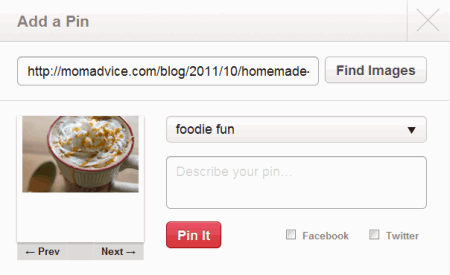
 

A picture of this Salted Caramel Mocha does not move me to repin this if the original pinner does not have a description. What is this? Why would I want to repin it?
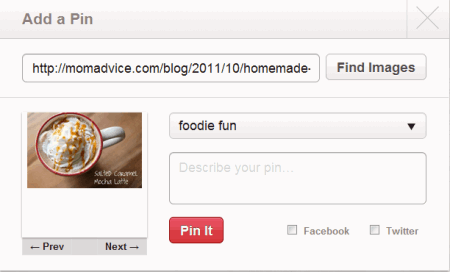


A picture that clearly states that this is a Salted Caramel Mocha coffee drink? Heck ya! Let me repin that for you.
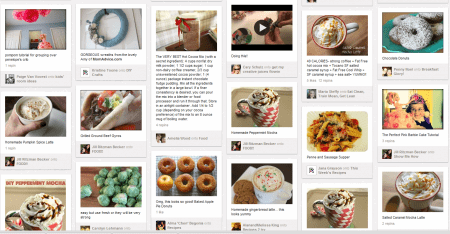


Source Yourself- Not sure what is being pinned on Pinterest from your site?  It is simple to see what your users are pinning on Pinterest.  I just go to http://pinterest.com/source/momadvice.com/ to see the pins from my site. You can do the same thing by simply replacing the last part of that URL with your own web address.

What happens when you source yourself? You can see exactly what people love on your site and it helps to guide the content on your site in a direction that can help with your traffic grow. It was through seeing the pins from my own site that I could see what people wanted more of. When I witnessed a wall of coffee pins, for example, I knew that I should create more fun coffee drink creations. As I created more of the content our readers loved, I created more pins and, in turn, created more readers.
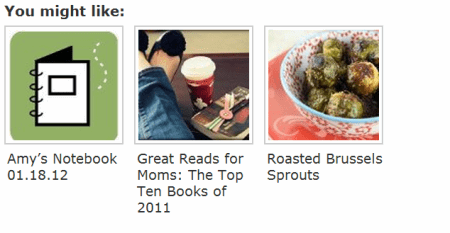
Make Archives Accessible & Visual- It always surprises and makes me happy when an old post starts gaining traction on Pinterest. I understand that my readers don’t have time to sift through eight years of content to find the gems. I don’t have time like that to devote to my own site so that is why it is important that you make those archives accessible and visual for your readers.

Try adding a plugin like Link Within or Outbrain that will create pictures with links at the end of your post guiding readers to dig deeper into the site. This will get people clicking and pinning into your site without the necessity of creating even more content. Make sure that you are checking Pinterest so that you can see what old posts are being dusted off and pinned.

My photography was terrible when I started the site and so I do cringe often when I see old pictures going up on Pinterest. If you have the time to switch the pictures to freshen them up, I encourage you to do that to attract more pins. Once again, getting familiar with your camera and your camera manual is one of the best things you can do for your blog and will pay you back over and over again if you invest the time in it.

 

Jump on What is Trending- I like to visit the Popular link on Pinterest to see what the most popular pins are on Pinterest and to help me brainstorm content for the site. Jot down the ideas and themes that you see are popular and try to create your own unique spin on popular topics.

When I saw Mustaches were trending on the Popular section, we developed Mustache printables & Mustache Mug Templates that our readers could use. Mustaches weren’t necessarily a topic that I had planned to explore, but it worked out for us when the mustache fun hit Pinterest and attracted new readers to the site.

I do think that Pinterest has impacted our content in a positive way. Niche blogs benefit greatly from Pinterest, but any blogger can find ways to weave in content that can attract Pinterest users while sticking to the core content themes of their blog. Don’t be afraid to get creative or step out of your usual content box.
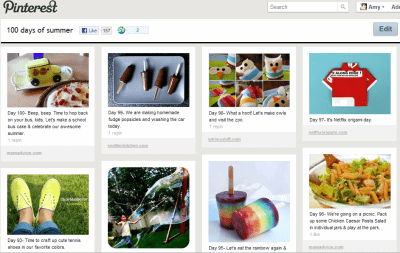
Create a Unique Pinterest Board to Engage Readers- Our readers may remember our 100 Days of Summer Pinterest board that I created at the beginning of last summer. I wanted to create an activity board of 100 activities you could do with your kids to keep them busy over the summer. Instead of sitting at my computer all summer, I switched my posting schedule and used Instagram to document the activities we completed off of the list.

Creating a unique Pinterest Board that could attract new readers is a fun way to interact with your community and bring more traffic to your site. If you run a blog on organizing, for example, you could create a 30 day organizational challenge and pin ideas from other bloggers and weave in a few pins from your own site on how readers could take on a challenge like this.
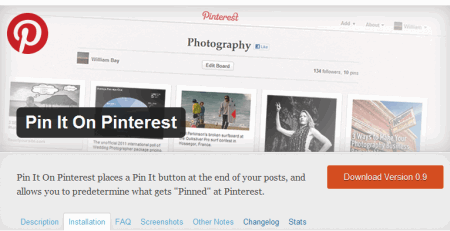
Install a Pinterest Plugin To Your Site- If you want to make pinning even easier for your readers, consider adding a Pinterest plugin to your blog. We recently added the Pin It On Pinterest plugin to inspire you to pin from our site. With this plugin, I am able to select the pictures that I would like people to pin from the post and even fill in a description of the pin so our readers can simply click and have the pin ready for them, making it easier to spread your content quickly.

Pin Yourself- You can absolutely pin yourself on Pinterest and I encourage you to do that! I like to treat Pinterest just like I treat all of my other social media outlets I belong to.  I try to pin lots of other great bloggers and pin myself every ten pins or so. I don’t want people to think I am only about self-promotion so I concentrate on the things that I think those that follow my boards would really like from our site.

Pin Wisely- Just as I have shared about other aspects of my career, I treat Pinterest with the same professional manner I treat my Twitter stream and Facebook stream. While I may find certain things funny on Pinterest, I have to remember what my readers may think is funny might not be the same as my idea of funny. More importantly, working for other brands also keeps me conscious that I am pinning things that reflect well for my job with them. Hopefully one day Pinterest will have private boards where I can muck it up a bit, but for now I try to keep my pins family-friendly and brand-friendly.
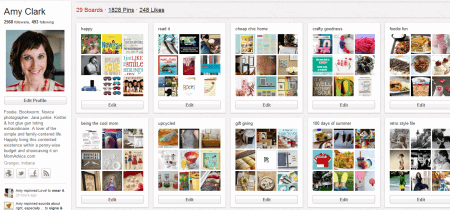
Just Get Pinning- It’s time to get pinning and build your presence. Don’t be afraid to set up your own network of bloggers to help promote each other on Pinterest. Just like all things in blogging, the beauty is in the community that you surround yourself with and sharing the traffic love!

I hope you will follow me on Pinterest because I  love new friends.

I really, really do.

Let’s talk about using Pinterest for your business! What has helped you build your presence on Pinterest? What tips do you have for other bloggers? Do you have any questions for me about how I use Pinterest? Have any Pinterest tutorials you would like to share? Feel free to link them up below!

Pin It

79 Comments

Comments

  1. 1

    I have to say I think Pinterest is my favorite social media platform. I get a lot of traffic from it just by pinning regularly. Like you suggest, I pin others posts as well as my own. I have gotten into the habit of browsing the craft and recipe linkys each day and pinning things I want to try.

    Also, you are exactly right about creating unusual boards. My girls and I love making crafts for their American Girl dolls. So I pin a lot to my doll craft board. Consequently that is my board that gets the most followers. It’s off the beaten path and it’s a specific niche.

    Anyway, I came across this post while I was looking for your giveaway linky, and just wanted to let you know I really enjoyed it.

    [Reply]

    Amy Reply:

    I am going to have to visit that fabulous American Girl board, Jen! That sounds like a fun board to visit. I am so glad you have gotten some traffic love from Pinterest too. Thank you so much for your comment today!

    [Reply]

  2. 2

    What a great post! Pinterest has definitely increased my traffic, but you just gave me some new ideas. I just checked to see what was being pinned on my site and it was insightful.

    I’m looking forward to your photo tips next month. I need a little help with that.

    [Reply]

    Amy Reply:

    I think the best insight is seeing what is being pinned from my own site. It has helped me so much in narrowing our focus on the blog. Thank you so much for the comment!

    [Reply]

  3. 3

    I’m loving pinterest and think your tips (as always) are spot on! I have indeed found that adding text to a photo increases the likelyhood of being pinned and being repinned. I’ve even had a reader ask me to add images to a couple of old recipes she loved so that she could pin them (which totally made my day)

    Another thing I’ve done is to use pinterest as a research site for posts. For example, I searched pinterest and the web for free printable 2012 calendars on and off for about 3 weeks at the end of the year, pinning them all on a board so I didn’t forget what I’d found! Then I was able to create a blog post with a printable calendar roundup from that post:

    http://pinterest.com/jennfowler/calendars/ and http://pinterest.com/jennfowler/calendars/

    [Reply]

    Amy Reply:

    Such a great idea, Jenn! I love how you can gather great pins like that to create more content for your blog. Thank you so much for sharing that tip!

    [Reply]

  4. Pingback: GOOD READ: How To Be a Pinterest Superstar.

  5. 4

    I love this, Amy! I have to say YOU are a superstar pinner. I always love what you find and appreciate your carefully curated pins. This is such a helpful post. (I’m pinning and stumbling it – I MUCH prefer Pinterest to SU these days though!)

    [Reply]

    Amy Reply:

    Aw, you are the best, Megan! Thank you so much, sweet friend!

    [Reply]

  6. 5

    What I find frustrating is that 5 times I have go Pinterest and requested an invite (and why do we need one in the first place?. 5 times I have received an email thanking me for my frequest and that one will be forthcoming soon. 5 times I’ve not received one!! So again, why do I need one???
    Thank you for your post and I really like the ideas you share and if I ever get on Pinterest and get set up there, I will gladly use your suggestions.

    [Reply]

    Amy Reply:

    I can send you an invite, Lynn Maire! Let me see if that is more effective :)

    [Reply]

    Lynn Maire Reply:

    Thank you so much. That worked and I’m in!! Now to follow your wonderful tips and get to it.
    Thank you again.

    [Reply]

  7. 6

    Last week Pinterest was my number 1 traffic driver. I’m certainly paying more attention now. I did my first post this week with a label as you suggested. Now I just need to improve some of my photo shooting skills. Thanks for this great post!

    [Reply]

    Amy Reply:

    You are so welcome, Emily! You can’t beat the amazing free traffic from Pinterest. I promise to share more on the photography too! I know just getting familiar with my camera manual has really helped our site grow! Thank you for the comment today!

    [Reply]

  8. 7
  9. 8

    Such excellent advice, I have seen huge benefits to my traffic from using Pinterest and I also cringe at some of the bad pictures that have been pinned… if only I could go in and edit them all!

    [Reply]

  10. 9
  11. 10
  12. 11

    There’s so much helpful advice here, Amy! Like you, Pinterest has had a huge effect on my business model and traffic. And the best part about it is it’s something I truly enjoy and it results in quality traffic, two things I can’t really say for StumbleUpon!

    [Reply]

  13. 12

    Thank so much for the helpful advice especially checking to see what people are pinning. I started a few months ago and love Pinterest and have seen a boost in traffic. A lot of my boards are Nautical since I love it. Thanks again,

    [Reply]

  14. 13

    I love pinterest, both personally and for my site. I’ve started creating seasonal boards that I post the link to on Facebook and Twitter. Great post, and I too not only pin my own content but content from other great blogs I find. Thanks for sharing your insights!

    [Reply]

  15. 14

    Thank you so much for this post. I’ve been on Pinterest since it started I think but this made me realize the potential it really has as a social media method of getting to know other food bloggers and spreading the love. I was already following you which was how I saw this pin! :)

    [Reply]

  16. 15

    Thanks for the great info! I am new to Pinterest and I love it – for business building and just for fun.
    When I tried to see what others are repinning I get an error message. I tried changing to my original username since I changed it shortly after joining but that would not work either. Any ideas?

    [Reply]

  17. 16

    I found you on Pinterest! Surprised? I have been doing all that you have said here and more! I have had ONE post on Pinterest produce over 90,000 hits in just ONE month. It’s an old post, so I went back and updated it with my website and such. But, you are so right…Pinterest has given me a LOT of great traffic and help. I used my source to help me see what people are looking at and if it’s old, I go back and revise the picture with text and then re-pin and tell my FB page about it to get it going again. It works great!

    Becky B.
    http://www.organizingmadefun.com
    Organizing Made Fun

    [Reply]

  18. 17

    I’ve noticed that I’ve had some great traffic from pinterest, but have not had a clue what more I could do to capitalize on it. Thank you so much for this post! You answered many questions I’ve had about pinterest and given me some new ideas. I’m so glad that I read this post!

    [Reply]

  19. 18

    This is some great advice! And it sounds like you have done very very well with pinterest. You didn’t mention how many of the 100,000 visitors per month were from pinterest but I bet it was quite a few which is really cool. I will try to follow some of these tips, thank you!

    [Reply]

  20. 19

    Love the advice. I’ll be adding text to my images from now, and when I go back to link to an old post within a post.

    I also didn’t realize there’s a way to see what people are pinning from your site.

    I love the idea of creating niche boards like the 100 activities for summer. I just got something from Peapod with a link to their board about healthy recipes. They linked to lots of different sites instead of just their own.

    [Reply]

  21. Pingback: Friday Featured Posts About Blogging & Social Media - Simply Stacie

  22. 20
  23. 21

    Just followed you. This post was super helpful. I’m working on rebranding my blog and part of that is making the posts more friendly for Pinterest so that people will repin them.

    [Reply]

  24. 22

    I found your blog in the paper newspaper. I’m sure you know about the Chicago Tribune article that mentioned your blog. Thanks for the post I didn’t know I could so easily check for pics being pinned from my blog.

    [Reply]

  25. Pingback: Freebie Friday: February 3, 2012 | The Motherload

  26. Pingback: Pinning with Purpsose « Heather Spriggs

  27. 23
  28. 24
  29. 25

    Yesterday was my first visit to your blog and I got here from Pintrest! I am LOVING all of your blogging info, it has been very inspiring. My blog is pretty new and I’m working on upping my site traffic, thanks for all of these great pintrest ideas, its really got my wheels spinning.

    [Reply]

  30. 26
  31. Pingback: Resources: Social Networking - Sadie Lankford | Sadie Lankford

  32. Pingback: Pinterest Finds – Things I Want to Try This Week

  33. 27
  34. Pingback: Around the web this week (2/11/12)

  35. 28
  36. Pingback: How To Be a Pinterest Superstar | The Motherload | SUNLIT IDEAS

  37. 29

    This is great… but I cannot get them to invite me!!!!!! Seriously, applied for an invite in November, then again last month:( This makes me sad bc I’m a totally crafty and crafting girl! lol

    [Reply]

    Amy Reply:

    Just sent you an invite :) Hope that helps!

    [Reply]

  38. Pingback: Where are the Spokane guys on Pinterest? » Design Spike®, Inc. Blog

  39. 30

    Thank you for the great ideas. I am new to Pinterest and was stumped on how to use it to drive traffic to my website. You have provided me with lots of ideas to get started. I look forward to the photography post.

    [Reply]

    Amy Reply:

    Stay tuned- that post will go up tomorrow!!

    [Reply]

  40. 31

    Love your info! Just starting my new blog about being a “good enough” mom and Pinterest is one of the things I have used to drive me to blogging. I am also a teacher and am doing training on how to use Pinterest in elementary education. You have given me a burst of energy! Thank you and best wishes!

    [Reply]

  41. 32

    Thank you for posting this. I am new to Pintrist and trying to figure everything out. :) This is a very helpful post!

    [Reply]

  42. 33

    Thank you for all of the great information! I am a relatively new blogger and have been doing most of the things you recommend but the tip on checking out the Popular board on Pinterest was a new one. I will definitely be doing this to get some ideas and inspiration for future posts.

    Much appreciated!

    Claire @ alittlesomethinginthemeantime.blogspot.com

    [Reply]

  43. 34
  44. 35
  45. 36

    I have to say, I am new at blogging. And believe it or not I started blogging because of pinterest. I had been pinning away for a while. Then started doing the pinning projects and decorating projects I was pinning. So pinterest was my first inspiration for my reason for blogging. A great socail media in my opinion! You have great insight, thanks for the tips!

    [Reply]

  46. 37
  47. 38

    Good advice. I’ve noticed some of this myself and really want to improve my photos. I’m learning with that though. I do notice that I get more pins with kids crafts and diy, and less with the art posts. The truth is, that while there is a solid audience for art on pinterest, it is not a very big audience. I think I have to be okay with that. But your post has also inspired me to start posting some of my recipes. I wish my photography was a little bit better, but I think I can finagle it to pin well. I actually do create my own recipes, but never really thought to post about them much, even though cooking can be just as creative as painting. And tastier, too.

    [Reply]

  48. 39
  49. 40

    Some seriously awesome tips! I got my invite over a year ago, but have been avoiding Pinterest because I KNEW it would be addictive. I actually have to set a timer or I would be there all night!

    And, yes, I found this article via Pinterest. And, yes, I followed you. :)

    [Reply]

  50. Pingback: Pinterest…My New Addiction!!! « Jolene West's Weblog

  51. 41

    You have some really great tips! I recently started my blog and love that I have such a great tool at my fingertips to try to generate traffic! I look forward to your pins and future posts!

    [Reply]

  52. 42

    Great tips! I can’t figure out how to get my pins to show up from my site- i have a shop on etsy and can’t get them to show up when i put my shop name into the url, http://pinterest.com/source/brooksboutique.com/ It says error 404 every time and I have pinned stuff from my shop many times, as well as have others. Can you help? thanks! Amy

    [Reply]

  53. 43
  54. 44

    I did not have time to read ALL 40 posts on your site, so it if I duplicated a remark/question please advise what # you answered it. I want to know what reason, if any, one would use the – allow others to post to your board (s). Do you have a psychology behind that? My boards are starting to take shape and therefore become very personal. When and how would you use this option. I sense it has a good purpose but i don’t know what.
    thanks and I appreciate your tips. I got a couple of nuggets from reading this. :)
    maryl bogge

    [Reply]

  55. 45
  56. 46
  57. 47

    I cant figure out how to mark someone I want to “follow”. Advice please?

    [Reply]

    Rachel R. Reply:

    Kathy, you would go to THEIR Pinterest page (pinterest.com/theirusername), and then there’s a red “Follow” button at the top, just above their boards. You can either click that, or you can click the individual follow buttons below specific boards.

    [Reply]

  58. 48
  59. Pingback: Shannyn Schroeder | Author

  60. 49
  61. Pingback: Link Feast For Writers, vol. 18 | Reetta Raitanen's Blog

  62. 50

    LOVE Pinterest. Thank you for your info. I try and find my own pins and make my boards interesting. Working on getting more followers. Thanks again.

    [Reply]

  63. 51
  64. Pingback: Pinterest Finds - Things I Want to Try This Week - Crazy Adventures in Parenting

  65. 52

    My source page doesn’t work properly, either, and it drives me bonkers! I KNOW things are being pinned, because I’m getting thumbnails in the “also pinned from” section. But if I click to go to that actual page, there are only a few pins.

    I’ve been trying to go through and add pictures to some of my older posts that didn’t have any (and in some cases, to go ahead and Pin them to my boards).

    I’m also learning the importance of keywording my board names, board descriptions, and Pin descriptions. Right now, the only people who are really pinning my stuff are the people who already follow me. That’s a relatively limited audience. But no one will find my Pins via search if relevant keywords aren’t there in the descriptions! (I’m not talking about some bizarre over-the-top keyword-stuffing, but “Wow; cool!” is not going to help somebody find something.)

    Also, it’s weird for me to put hashtags in a description because I don’t tweet my Pins (I pin often enough that I think I’d drive my Twitter followers crazy!), but others who repin MIGHT – and they might not retype the text first. So it’s still helpful to include hashtags.

    [Reply]

  66. 53
  67. 54

    Thanks for the tips. I am certainly going to get my camera going more often! We have also found pinterest to be great for our website, I can see improvements possible. We always add images to each post and make it pin friendly, but adding a ‘real’ image might make it better.

    [Reply]

    Amy Reply:

    I do think “real images” get pinned more than stock photography and I think it helps to personalize it for your readers too. I am so glad you found some value in this tutorial!

    [Reply]

  68. Pingback: Welcome, Type-A Philly Attendees! | The Motherload

Leave a Reply

Your email address will not be published. Required fields are marked *

You may use these HTML tags and attributes: <a href="" title=""> <abbr title=""> <acronym title=""> <b> <blockquote cite=""> <cite> <code> <del datetime=""> <em> <i> <q cite=""> <strike> <strong>