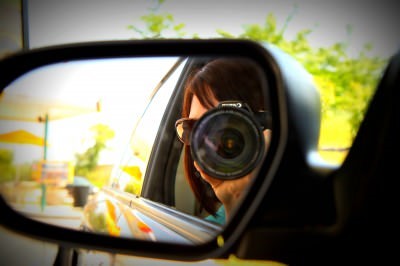
One thing that people have been asking me to share about is how to get fantastic pictures of your little ones. It was a request that I felt weird about accepting. I am just a mom who loves to take pictures. I have no formal training, no accolades, no studio, no professionalism at all… In all seriousness, it feels strange to speak with authority on the subject.
Here is what I want you to know though! In this day and age, anyone can be a great photographer. We have more equipment, more free tools, more books, and more resources than ever before. Unfortunately, the key to becoming great at something is good old-fashioned practice, reading, hard work, and more practice. It is not necessarily spending more money and buying more equipment. It means, simply, getting familiar with what you already have at your disposal and being the best that you can be with what you have already in your hands.
That being said, my Mother’s Day gift last year was the Canon Rebel T1i, which has been a fantastic entry-level camera into the world of DSLR cameras. It was such an incredibly big deal to me to have something so glamorous and so fancy. It is something that I would never have bought myself because I can not bear to part with money. I am sure if you read me regularly, you are nodding your head at this statement.
Even if you do not have an DSLR camera, there are so many things you can do to make your photos just as spectacular with just a few tricks up your sleeve.


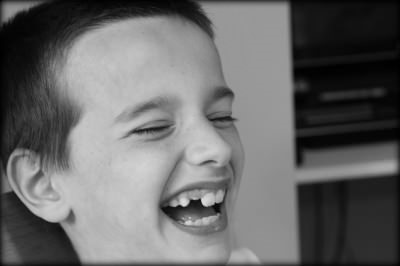
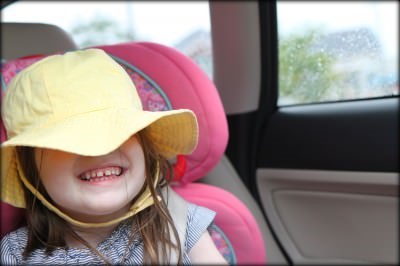
Shift Your Focus- So many times it is easy to plop everything dead into the center of a picture. It feels natural to do it that way, doesn’t it? This has been a really bad habit of mine that I have been working really hard to break. Shift your camera a little to the right, shift it a little to the left and see if you can tell a better story without having everything dead on in the center. Technically speaking, I learned the rule of thirds in a fantastic tutorial hosted by Sony and from the very famous photographer Me Ra Koh. The beauty of this simple trick is that anyone can do it with any type of equipment that you might have. Try thinking of your photos differently and shifting your perspective to tell the story!
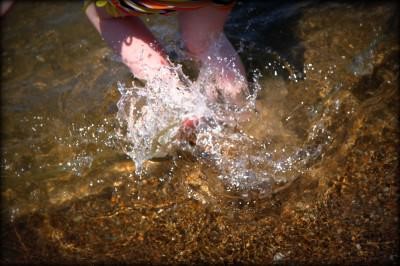




It’s All in the Details of the Story– Look through your camera with an artist’s eye and start capturing those small and hidden details of a story. My friends refer to this (sometimes annoying) habit of mine as my “artsy shots,” where I am taking shots of those often missed and hidden details that I want to remember about my children or about a particular place, event, or tradition that we have created together.
For example, baking a cake with your child and taking pictures of you making it together are wonderful and great. Imagine though if you took a picture of her hands stirring the batter for you, the feet that are pulled up on the stool, the snack that is shared while baking. Suddenly, you are telling a story of a family moment that will conjure up not only the special cake that you made together, but how small her hands were, that tradition of the chair pulled to the counter, the beauty of the batter that was poured, the picture of the anticipation as she peeked in the window of the oven for the cake to get done, the first slice, the crumbs left on an empty plate… Try becoming a storyteller and capturing the details that you *think* you will remember and that are sadly forgotten. These pictures are always my favorite and are my most-treasured photos in our family collection.





Sometimes It is About the Big Picture– Now that you are taking beautiful detailed shots of your children, it is also great to think about the BIG picture too. Big shots can tell a great big story too and I love to zoom in on one picture and then zoom out (even on the same shot) and see if the bigger picture can tell a great story.
Vacation photos are a really great time to practice this. Often where you are at for a vacation is a beautiful place with much to see and much to photograph. Focus your camera on your child, but zoom it out to show how little they are as they are walking around a large museum instead of just a shot of your child in front of one small display. It helps to showcase the wonderment and the beauty of being small.
My favorite wide shot remains the one of my daughter pictured in her dance class. If I had zoomed in on her, you would have missed the irony of her movement. She was in her element, a free spirit and wildly dramatic. With the shot nice and wide, you can see that my daughter was doing her very own little routine while the other kids were following the instructor. That is what I love about my daughter and it is now perfectly captured for our family.






Turn Off the Flash– This may require a bit of reading in your camera manual, but your pictures will be a thousand times better if you can turn the flash on your camera off. The only times that I do turn my flash on is when it is absolutely necessary (which is not often, if you can believe it) because in most situations going without the flash will create a much better picture.
Practice taking pictures in different areas of your home to find the one spot in your house where the lighting is the best and try to plant the kids there for portrait shots. Take your children outdoors (shaded spots work the best) and take photos outside instead of indoors, when visiting places (even if it is just a local restaurant) and snap pictures there. In most scenarios, you will find that taking a picture without the flash will make your pictures much more beautiful!
If I know that I am going to be in a low-light situation or I am looking for ways to get that perfect shot (capturing Christmas lights, fireworks, a child blowing out a candle, etc..) I will Google search for tips and practice with my camera before I go somewhere. Because I am Type-A like that.

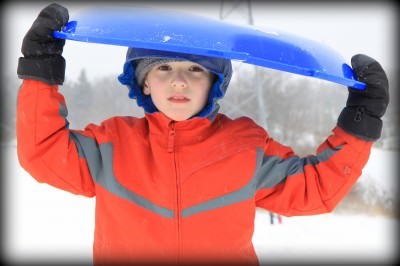

Edit. But Edit Wisely.– Once I have taken my photos for the day, I put them in Picnik and spend time editing them. I did pay for a premium membership, but it has been worth every penny ($24.95 per year) for editing my photos. I don’t use anything more fancy than this although someday I hope to learn Photoshop or Lightroom. For now, it is just what I need to help give my pictures a little pop. Try saturating the color in your pictures, switching them to black-and-white, or adding a little bit of softening to them.
Truly though, it is fun to edit, but the real beauty is the picture that is taken before the editing. Concentrate your efforts on taking a great photo and use a program to help add a little razzle dazzle to the great picture that you already have. Just remember that sometimes one can get carried away with the editing and you have pictures with all sorts of crazy fluorescent people at a party or unnatural weirdness to your photos. I hope that wasn’t too technical for you all.
Here are the most FAQ questions that people have asked me about taking pictures…
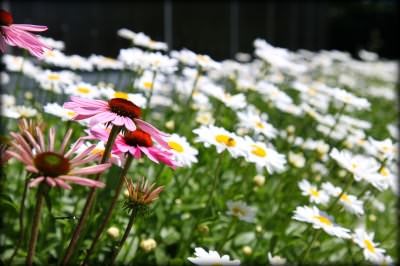
Q: How do you get everything to blur in the background of your photos?
A: One of the most exciting things to me about getting a new camera was the capability that I had to get sharp focus with a blurred background in my pictures. The way to do this is to change the aperture (or f-stop) on your camera. Aperture is the size of the opening of the lens when a picture is taken. One thing that is often very confusing is that large apertures (where lots of light gets through) are given f/stop smaller numbers and smaller apertures (where less light gets through) have larger f-stop numbers. So f/2.8 is in fact a much larger aperture than f/22.
To change your aperture, consult your camera manual to see what setting you will need to set your camera to. For my Canon camera, it means switching the dial to Av and then using the dial to turn it to the number that I wanted. I usually try to shoot in f/2.8 for most of my pictures, f/5.6 for much of my portrait photography, and f/22 for beautiful landscape shots with everything in sharp focus. For this shot of the flowers, I used f/2.8 to get just the front flowers in focus.

Q: How do you get the blurred edge on your photos?
A: The blurred edge is just something I add in Picnik. I just go under the Create tab and I select Vignette. Then I slide the slider down to almost nothing on the size of it. This adds just a tiny edge to the photo that is nice for online viewing, but not noticeable when printing them out or loading them on a digital frame. What can I say, it is my little signature move! You can do that with a free membership to Picnik, you definitely do not have to pay anything for that one!

Q: What equipment do you recommend and what do you have?
A: Again, I am not an expert on buying camera equipment, but I can tell you what I do know about it. I have always heard that it is much wiser to spend your money on your lens than the body of your camera. That is not to say to totally skimp on the body, but the body of cameras is constantly changing and being improved upon. I just got my camera this past summer and they have already come out with the Canon Rebel 2Ti, if you can believe it, and it costs quite a bit more than my already antique and outdated camera! The truth is, I will never stay current with the body of my camera because within a few months, a new one will already be replacing my ancient equipment.
If you are on a budget and are looking for a great point-and-shoot camera that has the same functionality as the DSLR, but you don’t have to buy lenses and make a huge investment, I loved my Canon PowerShot (the link takes you to the current model). I am a Canon girl and was really happy with this point-and-shoot camera. It is the camera that I recommend to my friends and I have always heard how happy my girlfriends are with their Canon PowerShots. Agonizing amounts of research were done before I selected that camera and I was very happy with it!
If you are still on a budget, but want to make a long-term investment and are just looking to shoot pictures of your family…then I will tell you what I have. As an aside, we found our lens on eBay from a photographer who was upgrading his equipment, but I am linking through Amazon for convenience sake. I have the Canon Rebel T1i and we bought the Canon EF-S 17-55 mm lens. They have kit lenses that are around $100 or more each and I have seen people take great pictures with these, but we made the investment in one really good lens that would do just about everything for me for the rest of my life and until I die amen. This lens is all I really need in most situations.
I don’t use my flash often, but for our recipe section and for some our evening events, I wanted to have an external flash. That was my anniversary/Mother’s Day/You Work Hard Sometimes gift and I got the Canon Speedlite 270EX Flash. If you don’t need something this fancy, I did really well with my Gary Fong Puffer Pop-Up Flash Diffuser (around $20) which really seemed to help my evening shots and didn’t take up a lot of room in my camera bag.
The most important thing to buy though is a lens filter to protect your lens. If for some reason you scratch your lens or something happens to the outside of it, this $10-$20 filter will protect the lens and be what breaks instead of your $100-$1,000 investment. Trust me, you will thank me later if you have this!
Q: Do you have any good books or websites to visit that can help me learn more about photography?
I am a HUGE fan of Scott Kelby and his Digital Photography Books 1, 2, & 3. See if your library has these and check them out for smartly written, witty, and down-to-earth tutorials on how to use your camera. I love that he says, “If you want a good portrait, turn you dial to this,” instead of high-brow photography terms that, as a mom, I just don’t understand. I just want someone to tell me what to do, not make me feel stupid!
For reading, I definitely recommend Digital Photography School for tutorials and Shutter Sisters for photography inspiration! I also love to see what Secret Agent Mama, Mooshy in Indy, I Should be Folding Laundry, I Heart Faces, and Me Ra Koh are doing with their cameras. The best part about them…humbleness and willingness to share.
Really though, the best thing you can do for yourself is to read your manual. Discover. Play with your settings. Practice. Read the manual again. Try new things. Be unafraid to fail. Become a human sponge and learn. Display those pictures creatively. Be the treasure keeper. Live your life fully, which will in turn, will create natural and picture-worthy moments. Love.
Questions and comments are welcomed and appreciated!
Disclosure: All of the links above are affiliate links and are provided so you can locate your camera equipment and tools easily. Feel free to order through our site, but we always encourage shopping around for the best bang for your buck! Happy picture-taking!