The Motherload Blog

If you asked me the one thing that I could not live without, it would be my iPhone. Today I want to share the top iPhone apps that have organized my life and my family. This gadget has brought more organization to my life than I dreamed possible and is what I rely on daily to tackle the day-to-day tasks as a mom. Of course, you don’t have to have an iPhone to benefit from these apps, almost all of these are available to any smartphone user. Here are my top 7 apps to get your family organized.
Cozi

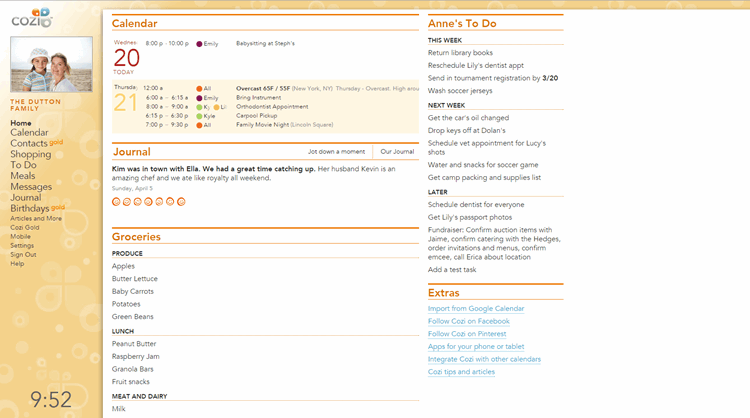
Whenever I talk about the best apps to organize a family, I always think of Cozi first. Over the years, this app has evolved so much and fits perfectly into our family’s everyday needs. Cozi is a calendar app that is made with a mom in mind. It is easy to use, color-coded (for each family member), includes pictures of your sweet little ones, helps you with your grocery list, and offers text message alerts to you for appointment reminders…all from one central location.

My favorite feature that has saved our family countless fees and embarrassment is their text reminder service. When I input our family’s appointments, I can have a text sent to myself or to my husband that reminds us about that appointment. The reminders can come whenever you designate them (one hour ahead, one day ahead, one week ahead, etc..).  Does your child have jean day at school? Super silly hair day?  Little things like that are even input in this handy calendar and a text reminder goes out to me first thing in the morning to save my children from their mom’s forgotten dollar or the super exciting monthly “skip your uniform,” day.

(Free. Available for the iPad, iPhone, or Android.)
 

Mint

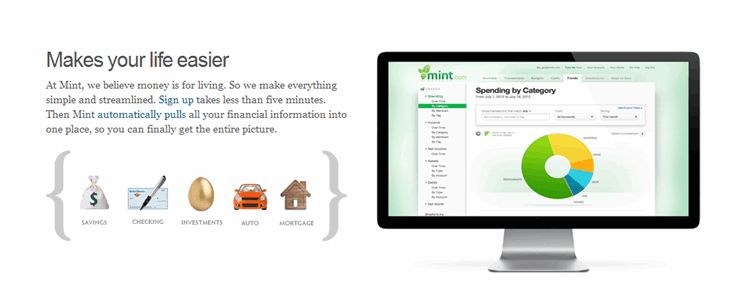
If you are looking to get your family’s finances back on track this year, my favorite and most reliable financial reporting comes from Mint. Mint can be set up through your home computer, your smart phone, or tablet.  An account with Mint can be set up in less than five minutes and gives you the chance to set budgets to your spending categories and track them with handy pie charts and graphs. In one glance, you can monitor your checking, savings, investments, and retirement at any moment during the day.

Most of the spending categories are immediately categorized for you while unfamiliar categories (like your favorite local restaurant or doctor’s visit) may need a quick categorization for accurate reporting. For tax purposes, you can also tag items for reimbursement so that it can help later when filing your taxes.

The best part, I have found, is that Mint will alert you via email when spending or withdrawals seem high. Did the mortgage company take out an extra payment? Did you have an unusually high amount of withdrawals in one month? Was a large deposit made? Mint sends you an email to alert you of unusual transactions happening in your account which could potentially save you from being the victim of credit card fraud.

(Free. Available for most devices.)
 

Grocery IQ

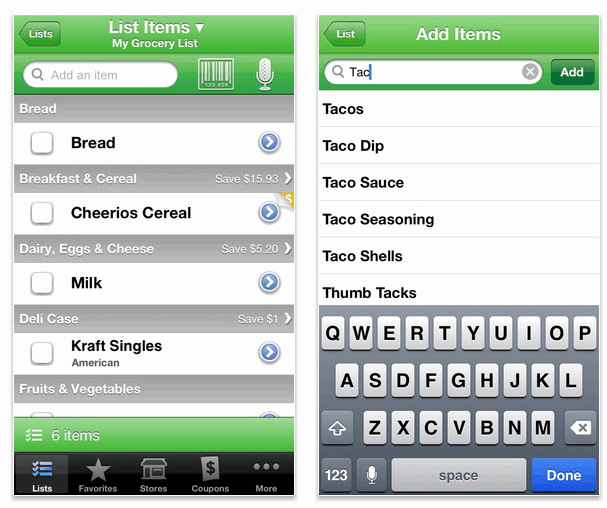
Making and sticking to your grocery lists has never been easier thanks to the Grocery IQ app. With Grocery IQ you can type, speak, or scan grocery list items into your list. The list automatically adds your items into categories and then alerts you if coupons are available for any items you might be adding to your list. Coupons can then be sent to your email when your list has been made or (if you have a wireless enabled printer) can be sent to your printer for printing. As you gather your items from your list, simply check it off and the item moves to the bottom of the list. Once your whole list is complete, everything is shifted towards the bottom and then can simply be clicked to add those repeat items back on the list for your next visit.

Since I always have my phone with me,  switching to an electronic grocery list has been much easier than I thought it would be. The coupon feature helps save our family money on items we were already planning to buy and the list helps keep our family budget on track. I also love that I can sync my list from my iPad to my iPhone so I can use whichever device I have handy to add items when we need them.

(Free. Available for the iPad, iPhone, or Android.)
Evernote

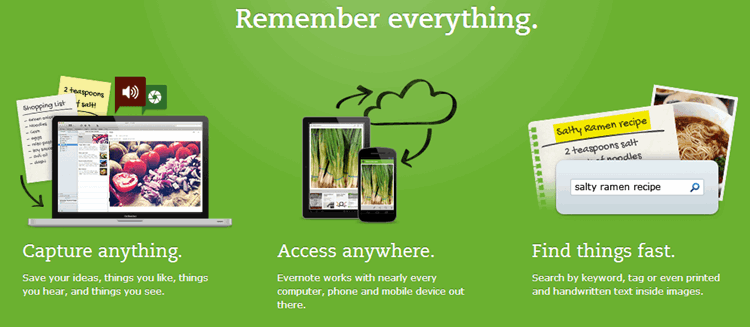
If you are trying to stop the paper pile-up from school, Evernote is a fantastic tool for  clipping and saving those papers in one spot that you can access from your phone or computer. When items come home to us that I might need to reference for our family later, like the cafeteria lunch schedule or the recess schedule, I can either take a photo of what I need or I can scan that item into Evernote and tag it with, “School,” for easy reference.

Things that I often refer back to, like our library card numbers, gift card numbers that I want to store on my computer, receipts for purchases, or even keeping track of the books my children are reading in a particular series are all housed in my Evernote account for easy accessibility when I need them.

No more scraps of paper all over the house or hanging on to newsletters for one paragraph of information, Evernote has become my virtual notebook to keep us organized.

(Free. Available on most devices.)
SpringPad

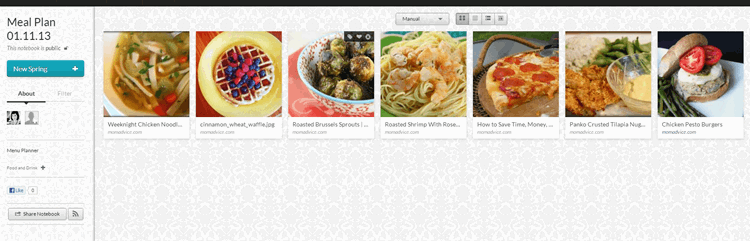
Menu planning can be a challenge for families and keeping track of all of those recipes you want to try can be a challenge when your Pinterest boards are overflowing with ideas. I have come to rely upon SpringPad for creating our family’s weekly menu plan. I think of SpringPad as a virtual notebook where you can privately or publicly share things you want to reference to manage your life. Notebooks can be created on any topic, but I create weekly notebooks of menu plans for my family, adding those recipes into a notebook so that I can reference them later, whether I am cooking in the kitchen or I am at the grocery store and not sure if I added all the ingredients to my list like I thought.

Depending on how the recipe is input into the source, SpringPad will either pull the recipe right into your notebook so you can view it right from the notebook, you can manually add in the recipe, or a link to the recipe will be provided so you can access it from the page you found it.

(Free. Available on most devices.)
30/30

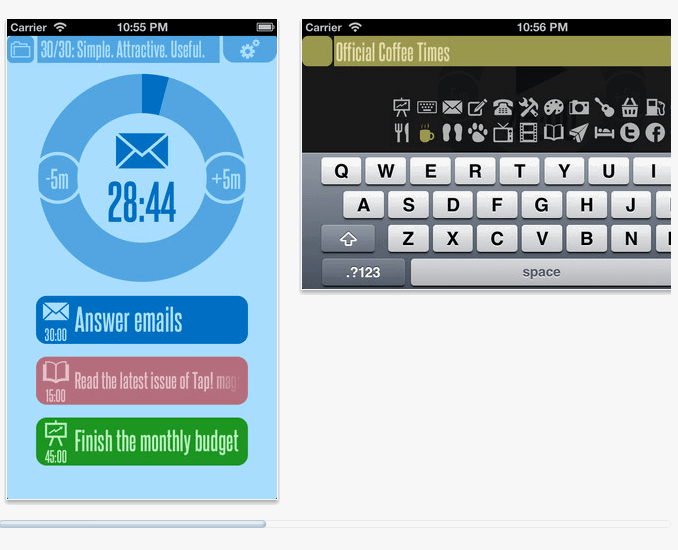
Setting a timer to get tasks done around the house is an old school method that works remarkably well for productivity that has now been brought to the future with this 30/30 app for organizing your day.  The idea behind this app is very simple: you work for thirty minutes and focus on a single task with no distractions. When your time is up, you give your mind a break and do something completely unrelated, also for thirty minutes. This 30/30 cycle is repeated until your tasks are done.

Type in what your ideal day will look like including blocking out times for a little down time like enjoying a cup of coffee, time wasting on sites like Facebook or Pinterest, or just time with a great book.  Then set up what the rest of your productive day will look like and use the 30/30 app to visualize if you are going to get your tasks done in the designated time.  It provides a countdown and a visual reminder of what you are working on and beeps when your time is done. Simple, visually pleasing, and highly effective, I can’t recommend this app enough to increase your productivity.

(Free. Available for the iPad or iPhone.)

8MM Vintage Camera

Capturing my children on-the–go is one of the main reasons I decided to get an iPhone. While I rely heavily on Instagram for capturing still images of our family from day-to-day I also love to capture movies of them.  Although we have many fancy camcorders laying around our house, the one recorder I always have with me is my phone. I am a huge fan of vintage looking film and pictures so I have found that the  8MM vintage camera app is a fun way to add a little vintage to our family’s most precious recorded moments.

($1.99. Available for the iPad or iPhone)

What are your favorite apps for keeping your family organized? Chime in here and share your family’s favorite tools!

Pin It

29 Comments

Comments

  1. 1

    Amy, I love this! EVERNOTE is by far my most relied-upon app for all the reasons you mentioned, #1 being the kids papers from school. I no longer sigh with dread when the teacher hands me a stack of “crap”. :)

    SPOTIFY is another great one. At first I shirked the 9.99/mo because I’m super frugal too. But then I looked at my itunes spending and realized I was spending about that much buying music anyway.

    DROPBOX is my catchall for my files and most importantly my photos. My favorite feature is the automatic upload of my photos from my phone. I can snap a photo, open dropbox, and within a minute or two I can access that photo from my laptop, my kindle, even my TV through my ROKU box (everyone needs one of these too).

    FAHRENHEIT is my weather app. It tells me the temperature outside in a counter on the app icon. I never have to open the app to know what it’s like outside. But if I do open it I can see a pretty accurate 10-day forcast for my region as well as anyplace I might be traveling to (or imagining traveling to). :)

    CLOCKPRO I often forget about because it’s SO central to my life I forget it’s not a standard built in app. It is my bedside alarm clock, my egg timer, stopwatch, etc.

    A few others I use all the time are XPENSETRKR for mileage, ACCOUNTS2 for a checkbook, and BILLMINDER for keeping track of (and reminding me) when bills are due.

    Oh! One last one SOUNDHOUND! I forget about this one, but I love that it’s there. When you hear a song on the radio, or TV, SoundHound will tell you who’s singing it and even scroll the lyrics on the screen. Very cool.

    Thanks for the tips, Amy, there were a few new apps I hadn’t seen before! I hated Mint actually years ago when it started but I may take a second look now. Maybe enough time has gone by they’ve tested the system enough that it’s more stable. :)

    [Reply]

    Amy Reply:

    Oh, I love Dropbox!! It is awesome for so many reasons! I couldn’t agree more. I still haven’t sucked it up and paid for Spotify yet, although the ads are bothering me so much during our family dinners that I may be switching to the premium membership!

    I can’t wait to check out these other apps you shared, Natalie! They all sound so awesome. I can always use new weather and timer apps!! Wonderful ideas! Thank you so much for sharing yours!!

    [Reply]

    Krys Reply:

    Natalie – what a great list of additional recommendations! I’m going to check out Fahrenheit and Clockpro now…

    [Reply]

  2. 2

    Great suggestions COZI has lots of free apps

    My favs are -Photo Transfer APP (this is the BEST) GASBUDDY, mapquest, kayak (travel app), soundhound or shazam, allrecipes, nightsky (tells you where all the stars are), pic frame,

    [Reply]

    Amy Reply:

    Great suggestions, Kathleen! Thank you so much for these app ideas! I can’t wait to try them out! Have a wonderful day and thank you for your comment!

    [Reply]

  3. 3
  4. 4

    Hi Amy, please take a look at Limetree (www.limetr.ee)
    It’s a web and a mobile app for parents to gather, document and chronicle the best moments of their children’s lives.
    Limetree is the perfect app for you to collect and save your children’s moments and recollections, when they happen, as they happen in real time. Now you’ll have the ability to save photos, videos, sound clips and texts directly from your iPhone. Never miss a moment again.
    Whether first steps or first words, you can safely store your children’s moments for them now, so they can enjoy it later. Everything is securely saved to the cloud, and you can access all your contents from anywhere at anytime.
    The app is complemented by our Limetree web application, where you can also upload, view and share your content. Our website offers even more opportunity for you to set up your account and profile.
    Shoot me an email and I’ll send you a voucher for you to try a Premium account!

    [Reply]

    Amy Reply:

    Thank you so much for sharing about this, Pedro! It sounds like a fantastic resource for families. I am so happy we have been able to connect through IG!

    [Reply]

  5. 5

    Ok, a couple of questions….I had gotten Cozi but dropped it quickly because I would have to input all the events from my iphone calendar into Cozi. Is there an easier way? I’m looking for something that would sync events input from my phone and my husband’s phone so we can keep track of & aware of family events.

    Also, dropbox. I’ve got that one but have only used it to look at photos a friend had loaded up from our football team. Can you expand on the helpful ways you use this app?

    Thanks for all of your helpful information!! Gigi Kennedy

    [Reply]

    Amy Reply:

    Gigi- I think it syncs with Outlook. I don’t use any other calendar resources so that is all I know about that!

    Dropbox can back up all of your phone photos so you can erase them and free up the space you need on your phone. Here is a step-by-step tutorial I found for new users: http://www.worldstart.com/copying-photos-from-your-iphone-to-your-dropbox-app/

    [Reply]

  6. 6

    I just started exploring Springpad and think it will be perfect for menu planning. Is there a way I can follow your menu plans? I always get inspired when you post menu plans and thought maybe I could see them on springpad.

    [Reply]

    Amy Reply:

    Jaime- Since we are doing the Take 5 Fridays on the Facebook community, I am trying to keep my notebooks private so that I can do some behind-the-scenes recipe testing and planning :) I’m so glad you liked this for your menu plans. Here is a notebook I created though for the example pictured here: http://springpad.com/#!/momadvice

    If you want to follow all my menu plans, here is a link to the Take 5 Fridays that I started: http://momadvice.com/blog/2013/02/take-five-fridays-meal-plan

    [Reply]

  7. 7

    I use Evernote for my meal planning, but your Springpad notebooks are a lot prettier to look at. What are some other reasons why you use Springpad over Evernote to menu plan? Thank you.

    [Reply]

    Amy Reply:

    Margrett- I was looking for something that reminded me of my love for Pinterest boards. I mainly use Evernote for clipping of important documents and files. I know that there is Evernote Food app though. I’m not sure if you have explored that app yet, but that would be an option if you wanted to stick with the Evernote platform. I hope that helps!

    [Reply]

  8. 8

    These are really useful suggestions! Like you, I couldn’t live without my iPhone.

    Plus, I already use Cozi, Mint, and Evernote, so you have really piqued my interest with the others on this list. My husband and I have been using the Cozi shopping list feature, but it has been a bit buggy lately, so I’m really excited to try out Grocery IQ.

    Thanks for the suggestions – I’ll try to remember to report back on how I like them!

    [Reply]

  9. 9

    My most useful app is Prep & Pantry. It’s an inventory app, it wasn’t free but it has paid for itself. It has saved me SOOO many times letting me check my food inventory at home while I’m at the grocery store. You can also put in expiration dates and use it as a reminder to use up items that are nearing their expiration date. Also, customer service for the app has been exceptional for the few times I’ve had questions on manipulating the data.
    Other favorites are Amazon Price Check, CardStar (lets you scan/input loyalty cards so you don’t have to carry them around), & Gyft (lets you input gift cards to keep up with what you have and what value is on them)

    [Reply]

    Amy Reply:

    Oh, I am totally looking into that one! Thanks so much for these awesome suggestions, Jennifer!!

    [Reply]

  10. 10

    I have been looking for a post just like this! Thank you :) I can’t wait to check out all the new app ideas. One I love is artkive for saving my kid’s drawings.

    [Reply]

    Amy Reply:

    I just heard about this app this week! I can’t wait to try it out. I’m a purger over here and it breaks Emily’s heart if I throw out anything she makes! It sounds like the perfect solution :)

    [Reply]

    Aimee Reply:

    Just purchased artkive on your suggestion. Thanks! This is much better than the system I have now.

    [Reply]

  11. Pingback: Freebie Friday: February 8, 2013 (A Podcast, Valentine’s Day Fun, & Take 5 Friday) | The Motherload

  12. Pingback: Weekend Reading: February 9, 2013 | Life Your Way

  13. 11

    Thanks for that list. I was so excited when my father got a new ipod and said he will give me his old one (my first ever!) And I love it, except is has IOS 4.2.1. and can not be upgraded, so none of the useful apps work on it :( Just some older games. But if I ever get a newer one, I’ll look these site ups.

    [Reply]

  14. 12

    I absolutely love this post and now hopelessly addicted to Springpad. I use Intuition instead of cozi and love this app. It is seriously my brain. Another app that I use regurally is Disney Jr, it is great when stuck somewhere with restless kids, I also use Pinterest app all the time.

    [Reply]

  15. Pingback: Links Worth Sharing – Week of February 9, 2013

  16. Pingback: 4 Easy Kitchen Shortcuts to Save You Time This Spring (& Spring Cleaning Giveaway Prize Pack!) | The Motherload

  17. 13
  18. 14

Leave a Reply

Your email address will not be published. Required fields are marked *

You may use these HTML tags and attributes: <a href="" title=""> <abbr title=""> <acronym title=""> <b> <blockquote cite=""> <cite> <code> <del datetime=""> <em> <i> <q cite=""> <strike> <strong>