Calendars, planners, and online software change each year so for the back-to-school season, I would like to share with you some of the family planning options available to you for the new school year. Many thanks to my Twitter friends for offering their own suggestions for what they use as it helped to get my list rolling!
For the first portion of our discussion, I wanted to discuss online calendars. Online calendars are great for families who spend a lot of time on the web and they can be easy to access when you are out and about from mobile phones and other computers.
Online tools are ideal for clearing the paper clutter from your life and can be easily shared among family members. When using paper calendars, it can be difficult to get your family all on the same page (so to speak) so online tools can be a great option for making sure everyone is aware of those meetings and appointments.
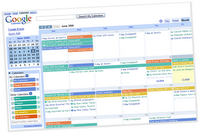 Google Calendar– This seems to be a favorite among families because it syncs so well with everything in a busy mom’s life. Busy families can easily link to one another’s calendars to avoid scheduling conflicts which makes it a very appealing option. You can import events from other calendar programs like Yahoo! Calendar and Microsoft Outlook. You also can set up multiple calendars for different areas of your life, like one for your daughter’s ballet schedule or one for your weekly night’s out with your girlfriends. Party planning and invitations can be done through the calendar as well as setting up reminders for important events in your life. I love that you can share your calendar with your family (or the world, if you so choose) which should help trigger your spouse’s memory for that dinner with your family that he was so not looking forward to.
 Cozi– In my opinion, this is one of the best free online tools that there is. I really just love the look and the feel of this calendar. I loved this calendar when it first came out, but they have made a new recent addition and you can now sync to Outlook, which makes adding events a whole lot easier. This software is made with a mom in mind. It is easy to use, color-coded (for each family member), includes pictures of your sweet little ones, helps you with your grocery list, has calendars with alerts letting you know when your appointments are and you can send love notes to your hubby…all from one central location. Left your grocery list at home? Just call Cozi’s toll-free number from any mobile phone and have your list read to you or sent as a text message.
 remember the milk– This site is great for our list-writing mommas. You can make as many lists as you like and no one will tell you to put your notepads away. Into tagging items on your blog? Use the task cloud to easily see what you have to do. Want to store notes along with your tasks? You can do that too. Saving gas is always a priority too and you can use the map feature to see where your tasks are located in the real world. See what’s nearby or on your way, and plan the best way to get things done.

Ta-da Lists- Another great site for the list-writing mommas because that is virtually all this program is. It is simple, it takes about ten seconds to sign up for an account and you can make as many lists as you like. You could also be like, “Ta-da!” and have this open on your computer with a giant list of things you need your spouse to do… you know, if you were that kind of spouse!
Do you use any online tools for managing your day? Do you utilize things like text messaging or a PDA to manage your day more effectively? What high-tech programs or tools have helped your day run more smoothly?